# 6.3- Pricebox

<span style="color: rgb(0, 0, 0);">Sur le **<span style="color: rgb(24, 139, 175);">menu à gauche du module</span>** vous trouvez un menu intitulé "**<span style="color: rgb(24, 139, 175);">Pricebox</span>**", il s'agit là d'une **<span style="color: rgb(24, 139, 175);">vue vous permettant de consulter sous forme de tableau tous vos produits </span>**et d'y effectuer des modifications sans repasser par un import.</span>

#### <span style="color: rgb(0, 0, 0);">**6.3.1- Les éléments du tableau**  
</span>

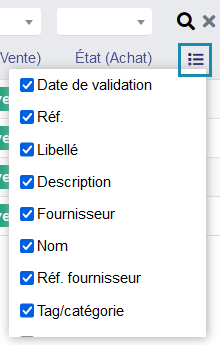
- <span style="color: rgb(0, 0, 0);">Date de validation (c'est la date à la quelle est effectuée l'import du catalogue sur le produit)</span>
- <span style="color: rgb(0, 0, 0);">Réf.</span>
- <span style="color: rgb(0, 0, 0);">Libellé</span>
- <span style="color: rgb(0, 0, 0);">Description</span>
- <span style="color: rgb(0, 0, 0);">Fournisseur</span>
- <span style="color: rgb(0, 0, 0);">Nom (du fournisseur)</span>
- <span style="color: rgb(0, 0, 0);">Réf.fournisseur</span>
- <span style="color: rgb(0, 0, 0);">Tag / Catégorie</span>
- <span style="color: rgb(0, 0, 0);">Prix catalogue</span>
- <span style="color: rgb(0, 0, 0);">Devise</span>
- <span style="color: rgb(0, 0, 0);">Remise fournisseur</span>
- <span style="color: rgb(0, 0, 0);">Prix de base</span>
- <span style="color: rgb(0, 0, 0);">Quantité</span>
- <span style="color: rgb(0, 0, 0);">Prix unitaire</span>
- <span style="color: rgb(0, 0, 0);">Coeff.coût</span>
- <span style="color: rgb(0, 0, 0);">Charges</span>
- <span style="color: rgb(0, 0, 0);">Charges unitaire</span>
- <span style="color: rgb(0, 0, 0);">Prix de revient</span>
- <span style="color: rgb(0, 0, 0);">Prix de revient non remisé</span>
- <span style="color: rgb(0, 0, 0);">Coeff.vente</span>
- <span style="color: rgb(0, 0, 0);">Prix de vent non remisé</span>
- <span style="color: rgb(0, 0, 0);">Remise client</span>
- <span style="color: rgb(0, 0, 0);">Prix de vente remisé</span>
- <span style="color: rgb(0, 0, 0);">Taux de marge</span>
- <span style="color: rgb(0, 0, 0);">Marge</span>
- <span style="color: rgb(0, 0, 0);">TVA vente</span>
- <span style="color: rgb(0, 0, 0);">Stock disponible</span>
- <span style="color: rgb(0, 0, 0);">PMP</span>
- <span style="color: rgb(0, 0, 0);">Limite stock pour alerte</span>
- <span style="color: rgb(0, 0, 0);">Stock désiré<s>  
    </s></span>
- <span style="color: rgb(0, 0, 0);">État vente</span>
- <span style="color: rgb(0, 0, 0);">État achat</span>

#### **<span style="color: rgb(0, 0, 0);">6.3.2- Les filtres de recherche</span>**

<span style="color: rgb(0, 0, 0);">Vous pouvez utiliser les **<span style="color: rgb(24, 139, 175);">filtres de recherche</span>** suivant (au-dessus du tableau) :</span>

- <span style="color: rgb(0, 0, 0);">Tag / Catégorie </span><span style="color: rgb(0, 0, 0);">(en haut à gauche) avec la possibilité de rechercher sur plusieurs catégories (la petite casse à cocher)</span>
- <span style="color: rgb(0, 0, 0);">Tout (permet de rechercher sur la référence, libellé, description, fournisseur, nom (du fournisseur), référence fournisseur)</span>
- <span style="color: rgb(0, 0, 0);">Réf.</span>
- <span style="color: rgb(0, 0, 0);">Libellé</span>
- <span style="color: rgb(0, 0, 0);">Description</span>
- <span style="color: rgb(0, 0, 0);">Fournisseur</span>
- <span style="color: rgb(0, 0, 0);">Nom (du fournisseur)</span>
- <span style="color: rgb(0, 0, 0);">Réf.fournisseur</span>
- <span style="color: rgb(0, 0, 0);">Remise client</span>
- <span style="color: rgb(0, 0, 0);">TVA vente</span>
- <span style="color: rgb(0, 0, 0);">Stock disponible</span>
- <span style="color: rgb(0, 0, 0);">État vente</span>
- <span style="color: rgb(0, 0, 0);">État achat</span>

#### <span style="color: rgb(0, 0, 0);">**6.3.3- Les colonnes triables**</span>

<span style="color: rgb(0, 0, 0);">Les **<span style="color: rgb(24, 139, 175);">colonnes sont toutes triables</span>** par ordre **<span style="color: rgb(24, 139, 175);">croissant / décroissant</span>** ou **<span style="color: rgb(24, 139, 175);">alphabétique </span>**<span style="color: rgb(24, 139, 175);"><span style="color: rgb(0, 0, 0);">en cliquant sur l'intitulé de la colonne</span></span>.</span>

#### **<span style="color: rgb(0, 0, 0);">6.3.4- Modifier des éléments</span>**

<span style="color: rgb(0, 0, 0);">Vous pouvez modifier :</span>

- <span style="color: rgb(0, 0, 0);">la colonne remise client</span>
- <span style="color: rgb(0, 0, 0);">chacune des lignes remise client</span>
- <span style="color: rgb(0, 0, 0);">chacune des lignes de prix de vente remisé</span>
- <span style="color: rgb(0, 0, 0);">chacune des lignes de limite de stock pour alerte  
    </span>
- <span style="color: rgb(0, 0, 0);">chacune des lignes pour le stock désiré optimal</span>

<p class="callout info"><span style="color: rgb(24, 139, 175);">**Note :** </span><span style="color: rgb(0, 0, 0);">Pour ne pas modifier toute la colonne de remise client vous pouvez filtrer et modifier seulement les lignes filtrées ou modifier par ligne produit.   
Pour modifier cliquez sur le crayon et utilisez le point comme séparateur et pas la virgule. Ces modifications seront prises en compte sur la fiche du produit au niveau du stock et de l'onglet gestion des prix pour la remise client.  
</span></p>

<span style="color: rgb(0, 0, 0);">  
</span>

#### **<span style="color: rgb(0, 0, 0);">6.3.5- Choisir les colonnes à afficher</span>**

<span style="color: rgb(0, 0, 0);">Vous pouvez**<span style="color: rgb(24, 139, 175);"> choisir quelle colonne afficher</span>** via le menu "burger" se trouvant à droite du tableau. **<span style="color: rgb(24, 139, 175);">Cocher</span>** les colonnes a afficher, <span style="color: rgb(24, 139, 175);">**décocher** </span>les colonnes que vous ne voulez pas afficher (**<span style="color: rgb(24, 139, 175);">cet affichage est propre à chaque utilisateur</span>**).  
</span>

[![pricebox menu burger.png](https://doc.altairis.fr/uploads/images/gallery/2024-03/scaled-1680-/pricebox-menu-burger.png)](https://doc.altairis.fr/uploads/images/gallery/2024-03/pricebox-menu-burger.png)

<p class="callout info"><span style="color: rgb(0, 0, 0);">**<span style="color: rgb(24, 139, 175);">Note : Activer la permission </span>**pour voir le tableau.  
Les champs supplémentaires (extrafields) que vous aurez éventuellement ajoutés à vos produits seront pas gérés automatiquement sur ce tableau, ils ne seront donc pas visibles.</span></p>