# 1.3- Mise en route
#### **1.3.1- Procédure d'installation**Si vous avez accès aux fichiers de votre Dolibarr, dézippez l'archive du module dans le dossier custom de son arborescence.Sur les versions récentes de Dolibarr, le module zippé peut être installé directement depuis la page :**A**ccueil > **C**onfiguration > **M**odules/**A**pplications, onglet **D**éployer un module externe.
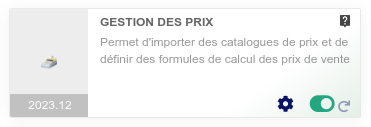
#### **1.3.2- Activation** Activez le module en affichant la liste des modules depuis les menus :**A**ccueil > **C**onfiguration > **M**odules/**A**pplications, onglet **M**odules/**A**pplications installés. Il sera affiché dans le tableau Altairis.
[](https://doc.altairis.fr/uploads/images/gallery/2024-07/P00s57JpPw3n1UNP-configuration-2024-07-30-17-14-57.png)
1. Activez le module en cliquant sur la pastille pour quelle devienne verte
2. Pour désactiver le module cliquer de nouveau sur la pastille pour quelle devienne blanche
#### **1.3.3- Permissions**Le module dispose des permissions suivantes :
- Initialiser le catalogue
- Importer un catalogue
- Valider un catalogue
- Afficher un catalogue
- Mettre à jour les coefficients
- Mettre à jour les prix
- Afficher l'onglet des prix fournisseurs (prix d'achat) sur la fiche produit (si autorisé par la configuration du module)
- Afficher l'onglet des prix clients (prix de vente) sur la fiche produit (si autorisé par la configuration du module)
- Afficher l'onglet de gestion des prix sur la fiche produit (si autorisé par la configuration du module)
- Voir la pricebox
#### **1.3.4- Paramétrage**La page de configuration du module est accessible depuis la liste des modules installés (**A**ccueil > **C**onfiguration > **M**odules/**A**pplications) en cliquant sur son icône [](https://doc.altairis.fr/uploads/images/gallery/2024-03/vAUimage.png).